
Please follow the steps given below to install Rediffmail Professional App on your iOS device.
STEP 1
Go to the Apple store & type Rediffmail Professional, the result will be seen below. Click on Install.

Note: You might get another app named “Rediffmail” only in the store, kindly do not download & install that app. You need to download “Rediffmail Professional” app
STEP 2

Once the app is installed, it will ask you to accept the Terms & Conditions, kindly click on AGREE
STEP 3
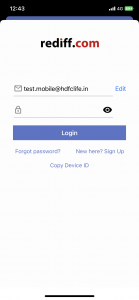
After you accept, you will see the screen to give your email address, kindly give your complete address as seen below & click on Proceed.

STEP 4
Mention the password of your account, click Login
STEP 5
Once the login details given are correct, then you will see another authentication page, you need to enter the OTP that will be sent on your mobile number or the alternate email address mentioned in the system.
Incase, you are not able to get the OTP through SMS or email then you can give a MISSED CALL from your mobile number to the number mentioned on the screen & then get automatically logged.in

STEP 6
Once the login process is successful,
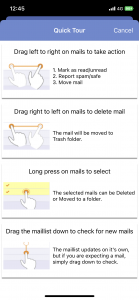
then on the 1st login, you will see Quick Tour that explains how to use the app.
STEP 7
Once the login details given are correct, then you be logged in & see the emails as seen below.

STEP 8
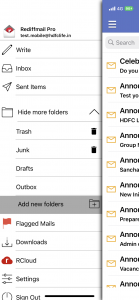
You can go to settings or folder view by clicking the == Icon on the top left side.

STEP 9
You can see more folders by clicking on “Show more folders”
STEP 10
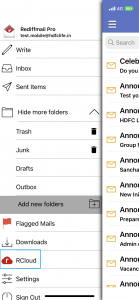
You can navigate to Rcloud by clicking on by clicking the == Icon on the top left side.
Kindly follow these steps to use your email address in Rediffmail Professional Mobile App
Follow this article for Rediffmail Professional Installation On Android Device.